Prepare a Tufting Design for Yarn Color Analysis
Before estimating yarn from an image, decide which pixels represent the rug you will tuft. Cropping, transparent borders, and shadows can change the color percentages even when the drawing looks similar on screen.
Use your own flat design
Start with artwork you own or have permission to use. A flat drawing with intentional colors makes a better planning input than a photo of a finished rug. Photos contain lighting, shadows, pile direction, and background objects that the software can mistake for separate yarn colors. The analyzer groups pixel colors; it does not identify the yarn brand or decode a maker's material list.
Export a PNG or JPEG that shows the design at its intended proportions. Keep a copy of the original before editing. Remove any room scene, ruler, caption, or decorative border that will not appear in the rug. If lettering belongs in the finished piece, keep it in the analyzed design even if you will mirror it later for transfer onto backing.
Choose the dimensions that describe the image
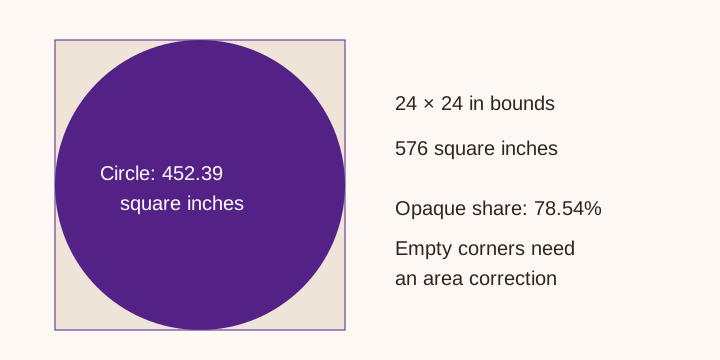
The homepage uses the width and height you enter as a rectangular planning area. It skips transparent pixels when grouping colors but does not reduce the total rectangular yarn estimate for transparent corners. A circular design inside a square image therefore needs an area correction or a separate measured calculation. The alpha threshold also means a soft translucent edge is not an exact physical boundary.
For an illustrative circle with a 24-inch diameter, the bounding square is 576 square inches. The circle occupies π × 12², about 452.39 square inches, or 78.54% of the square. Applying the rectangle's rate to the square would allocate about 27.3% more area than the circle contains. Use a measured area method before ordering an expensive irregular rug.
Simplify colors without deleting required details
A gradient may contain hundreds of pixel colors that you intend to make with only two yarns. Replace it with the colors you will actually use before analysis, or choose fewer groups and inspect the preview. Increasing the group count can divide one intended yarn into several similar shades. Decreasing it can merge an outline into its background.
The homepage currently omits groups at or below 0.5% of opaque pixels from its displayed shopping list. Fine lettering, a thin border, or a small accent may fall below that threshold even though you must tuft it. Add those details to a manual materials list. Do not assume an absent color needs no yarn. Grouping also uses randomized starting centers, so repeated analyses can produce different small-group boundaries.
Check the preview against your intent
- Compare the displayed palette with the yarn shades you plan to buy.
- Look for a missing outline, merged letters, or a background assigned to the rug.
- Check width and height against the intended shape, then inspect any aspect-ratio lock.
- Repeat with a simpler input if the preview does not represent the design.
A screen color is not a supplier dye code. Photograph a physical sample or compare a supplier swatch before a color-sensitive order. A hex value describes a display color, not wool reflectance, dye-lot consistency, or appearance under room lighting. The calculator cannot guarantee those matches.
Take the percentages into a measured plan
Once the color groups look sensible, record each share alongside a total from your test swatch. Use the cone planner for each color. If a carved outline or a different pile uses more yarn per area, give that section its own rate rather than assigning everything one average.
For a rectangular two-color example, follow the worked rug plan. For an irregular outline, keep your area calculation with the design file. This makes it possible to distinguish a shape assumption from an error in color grouping when you compare the plan with actual use later.
Privacy and method
The image-analysis code draws the uploaded image onto a canvas in your browser and samples a reduced version with a maximum dimension of 200 pixels. It does not intentionally upload that design to a server. Ads and Grow are separate third-party services described in the privacy policy; local image processing does not mean the whole page makes no network requests.
This explanation comes from the site's current implementation. It documents limitations rather than claiming validation against finished rugs. TuftLab is a separate calculator with controls for transparency and yarn parameters; its behavior and results do not validate this tool. Check whichever calculator you use against a small sample.